

 StatusPath Reports
Guides
Jira Workflow Review Checklist
A reliable Jira workflow review checks the question, work-item scope, selection window, history window, Calendar, sample size, detail rows, averages, outliers, exact transition directions, ownership, trend, and Jira History before recommending a change. The checklist makes every conclusion traceable. It prevents one high value or one chart from becoming an unsupported judgment about a workflow, team, or person.
Printable workflow review checklist
Copy this list into the review record. Mark an item complete only after its evidence has been recorded or linked.
A. Define the review
B. Test the signal
C. Validate and decide
The checklist is the primary asset on this page. The detailed Guides linked below explain each metric; this page controls the order and evidence gate for a review.
Real Jira scenario: Review is high, but what does that prove?
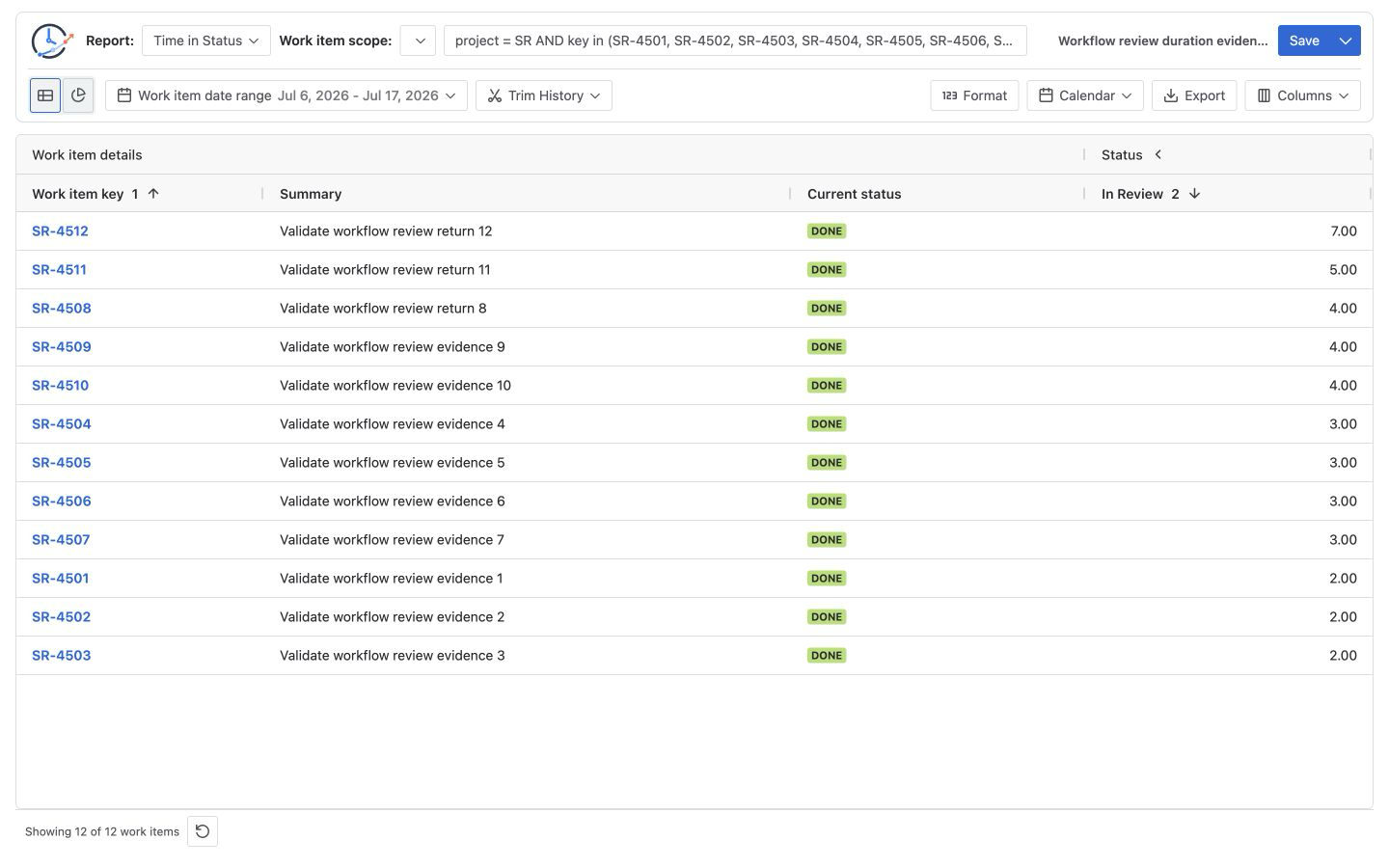
A controlled Jira scope contains 12 completed Stories, SR-4501 through SR-4512, using full history and a UTC weekday 09:00–17:00 Calendar. Their In Review durations are:
2h, 2h, 2h, 3h, 3h, 3h, 3h, 4h, 4h, 4h, 5h, 7h
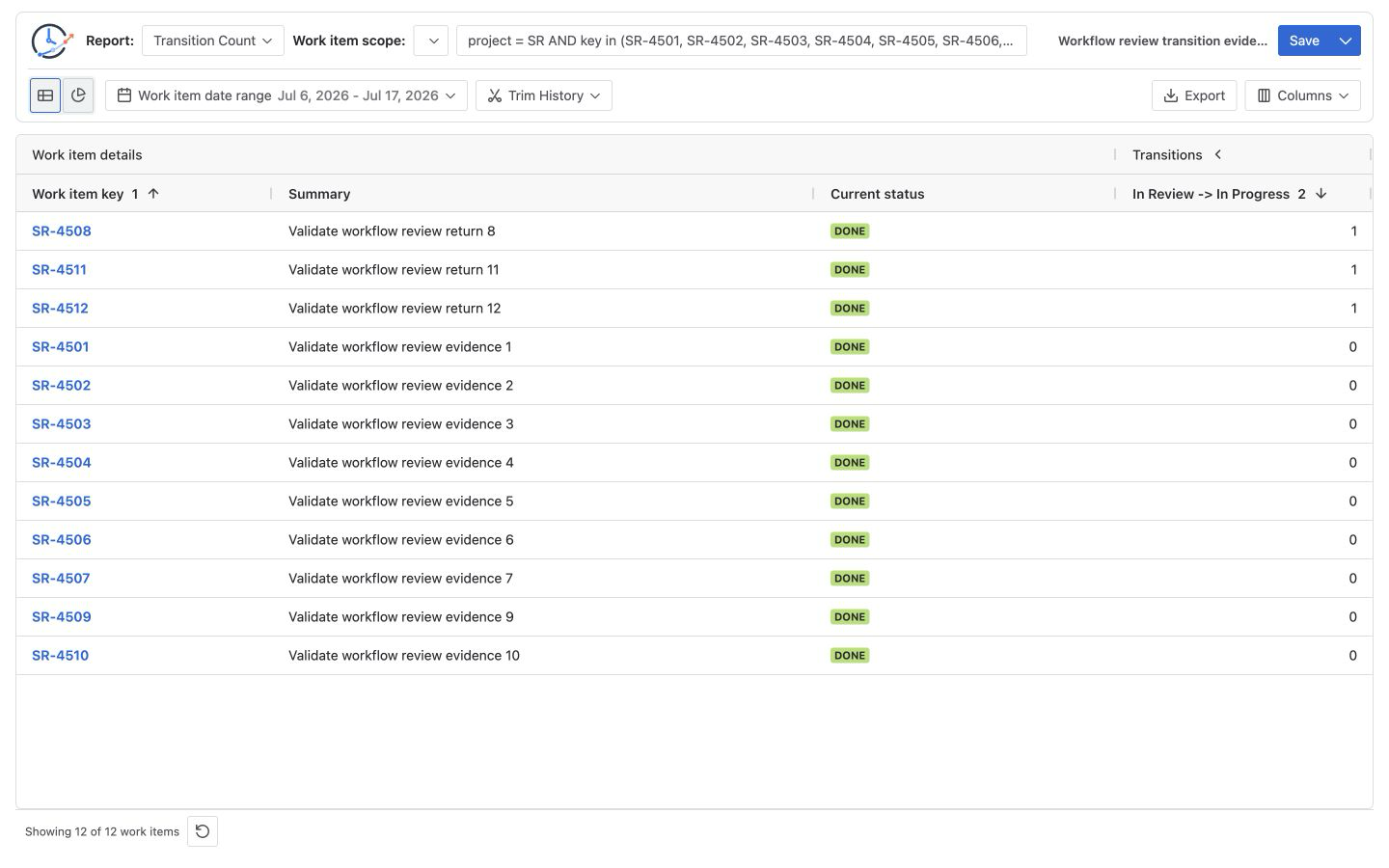
Three Stories returned once from In Review → In Progress and later entered In Review again. The remaining nine had one In Review entry.
| Evidence | Verified value | What it supports | What it does not prove |
|---|---|---|---|
| In Review total | 42h | In Review has the largest total among the selected statuses | Why the time accumulated |
| Review contributors | 12 | Every Story entered Review | That every Story had the same experience |
| Average In Review | 3.5h | A per-contributor comparison baseline | A target or service-level commitment |
| Longest Review row | 7h | One item deserves history inspection | A system-wide cause |
| In Review entries | 15 | Three entries occurred in addition to the 12 Stories' first entries | That every extra entry was avoidable |
| In Review → In Progress | 3 | Three exact return movements occurred | Whether the returns were defects or valid changes |
Manually reconcile the evidence
The duration arithmetic is:
Review total   = 2 + 2 + 2 + 3 + 3 + 3 + 3 + 4 + 4 + 4 + 5 + 7 = 42h
Contributors   = 12
Review average = 42h ÷ 12 = 3.5h

In Progress total = 24h
QA total          = 12h
The repeated-entry arithmetic is separate:
First In Review entry for each of 12 Stories = 12 entries
Extra In Review entry for 3 Stories          =  3 entries
Total In Review entries                       = 15 entries
In Review → In Progress returns               =  3 transitions
In this controlled workflow, Status Count shows 15 In Review entries. Subtracting the 12 Stories' first entries leaves 15 - 12 = 3 extra entries; Transition Count shows three In Review → In Progress returns. The values reconcile because every selected return is followed by another In Review entry. That relationship is not universal: a work item can enter a status from another direction, and a Jira looped transition can perform an action without changing status. Atlassian explains that workflow transitions are one-way and that moving back and forth requires separate transitions.
Apply the checklist in order
1. Start with the decision, not the chart
Use: “Should the team test a Review ownership change for the next comparable cohort?” Avoid: “Is Review bad?” The first question can produce a scoped action and rerun rule.
2. Verify the Jira population
Confirm expected and excluded work items in Jira before running a calculation. Atlassian says Jira has reports for spaces, boards, versions, sprints, and work items, and that company-managed reporting must use the intended board: Generate a report.
For this example:
project = SR
AND key in (SR-4501, SR-4502, SR-4503, SR-4504,
            SR-4505, SR-4506, SR-4507, SR-4508,
            SR-4509, SR-4510, SR-4511, SR-4512)
ORDER BY key ASC
The explicit key list keeps this worked example reproducible. For the next operational cohort, preserve the same inclusion rule and calculation definition but refresh the work-item set through a rolling Saved Filter or an updated population; rerunning the unchanged fixed list would only recalculate these 12 Stories.
3. Lock row selection and history calculation separately
The Work item date range decides which rows enter the report. Trim History changes which part of each selected row's changelog is calculated. Record both, even when one is blank. Use Report setup and scope for the product boundaries.
4. Lock the time basis
The example uses UTC weekdays 09:00–17:00 and Decimal Hours. Another Calendar can be valid, but it is a different metric definition. See the Jira business-calendar guide before comparing values across teams or weeks.
5. Inspect detail, total, average, and outliers together
Sort In Review descending in Time in Status. Reconcile 42h across 12 contributors with the 3.5h Average Time in Status result. The 7h Story is an inspection target, not a process diagnosis. The average-versus-total guide explains why both measures are needed.
Atlassian's Control Chart maps configured cycle or lead time and shows average, rolling average, standard deviation, and outliers for company-managed spaces. Its configured metric can corroborate variation, but it is not automatically identical to one-status Review time.
6. Define rework as directions, not labels
Run Status Count to find repeated In Review entries, then Transition Count with the explicit In Review → In Progress column. Use the transition-direction report template to record why this pair is included and what sample will be checked.
Atlassian documents status CHANGED FROM ... TO ... in its JQL operators reference. That clause selects matching work items; the documentation does not describe a per-row transition count or reusable matrix.
7. Check ownership only when the hypothesis needs it
If the proposed cause involves handoffs or unclear ownership, add Time in Assignee evidence. Do not rank people by time-held values. The Time in Assignee guide separates historical ownership from logged effort.
8. Compare a trend with the same definition
Use equivalent populations, Calendar, history boundary, and time bucket. Jira's Cumulative Flow Diagram can show a widening board-column band that generally indicates a bottleneck; interpretation depends on board-column mapping. A StatusPath trend can show the selected report metric over time. Neither view alone identifies cause.
9. Validate histories and record a scoped decision
Open the 7h Story, one typical 3h Story, and the other two returned Stories. The 7h Story is itself one of the three returned Stories, so this produces four unique work-item histories rather than double-counting it. Atlassian says Activity → History records field edits and movement through the workflow.
Write the decision in this form:
Observed: 42h Review across 12 Stories; 3.5h average; three defined returns.
Unknown: queueing, reviewer availability, scope change, or valid iteration.
Action: inspect four representative histories and test one Review ownership rule.
Owner: named review owner.
Recheck: refresh the work-item set under the same inclusion rule, then rerun the saved calculation definition on the next comparable cohort.
Common mistakes
Changing the workflow before validating the scope
A wrong board, stale filter, broad Project, or mismatched sprint can produce a convincing but irrelevant result.
Treating Work item date range and Trim History as one control
They answer different questions: which rows are selected and which history is calculated.
Comparing a mean without contributor count or distribution
The 3.5h mean needs 12 contributors and the 2-to-7-hour range. A small group or outlier can move an average.
Calling any return “rework”
Teams must define the exact pair and review representative histories. Jira does not provide a universal “backward” direction across custom workflows.
Inferring individual productivity
Status occupancy can include queueing, handoff, dependency, absence, batching, or policy. It is not logged labor or a universal productivity score.
Logging a conclusion without an owner or rerun rule
The review is incomplete until an action, owner, due date, and a recheck using the same definition are recorded.
Frequently asked questions
How often should a Jira workflow review run?
Choose a cadence that produces comparable cohorts and enough data for the decision. Weekly can work for active delivery flows; lower-volume teams may need longer periods. There is no universal sample threshold.
Which report should be opened first?
Start with Time in Status when the question is where individual work items spent time. Add Average Time in Status, Status Count, Transition Count, Time in Assignee, and trends only when they test a specific part of the hypothesis.
Does a high Review average prove a bottleneck?
No. Check contributor count, distribution, accumulated duration, trends, other workflow stages, and representative histories. Treat it as a signal to test.
Can JQL calculate the three return counts in this example?
Atlassian documents JQL history predicates for finding work items whose status changed from one value to another. The per-work-item count shown here comes from Transition Count, not from a documented JQL count output.
What should be saved after the meeting?
Save the reusable report configuration, decision log, linked Jira examples, and any point-in-time table or chart export needed for the record. A Saved Report is not itself a frozen snapshot.
Related Guides
- Weekly Jira Workflow Report Example for Management
- Jira Transition Direction Report Template
- How to Find Jira Workflow Bottlenecks
- How to Measure Jira Rework
Change one thing, then rerun the same definition
The checklist is complete when the evidence, uncertainty, action, owner, and recheck are all visible. Preserve the same inclusion rule and calculation definition while refreshing the rolling population, so the next review tests the change instead of moving the measurement boundary.
Try StatusPath Reports on the Atlassian Marketplace to assemble the row-level, average, transition, and trend evidence behind a workflow review.